














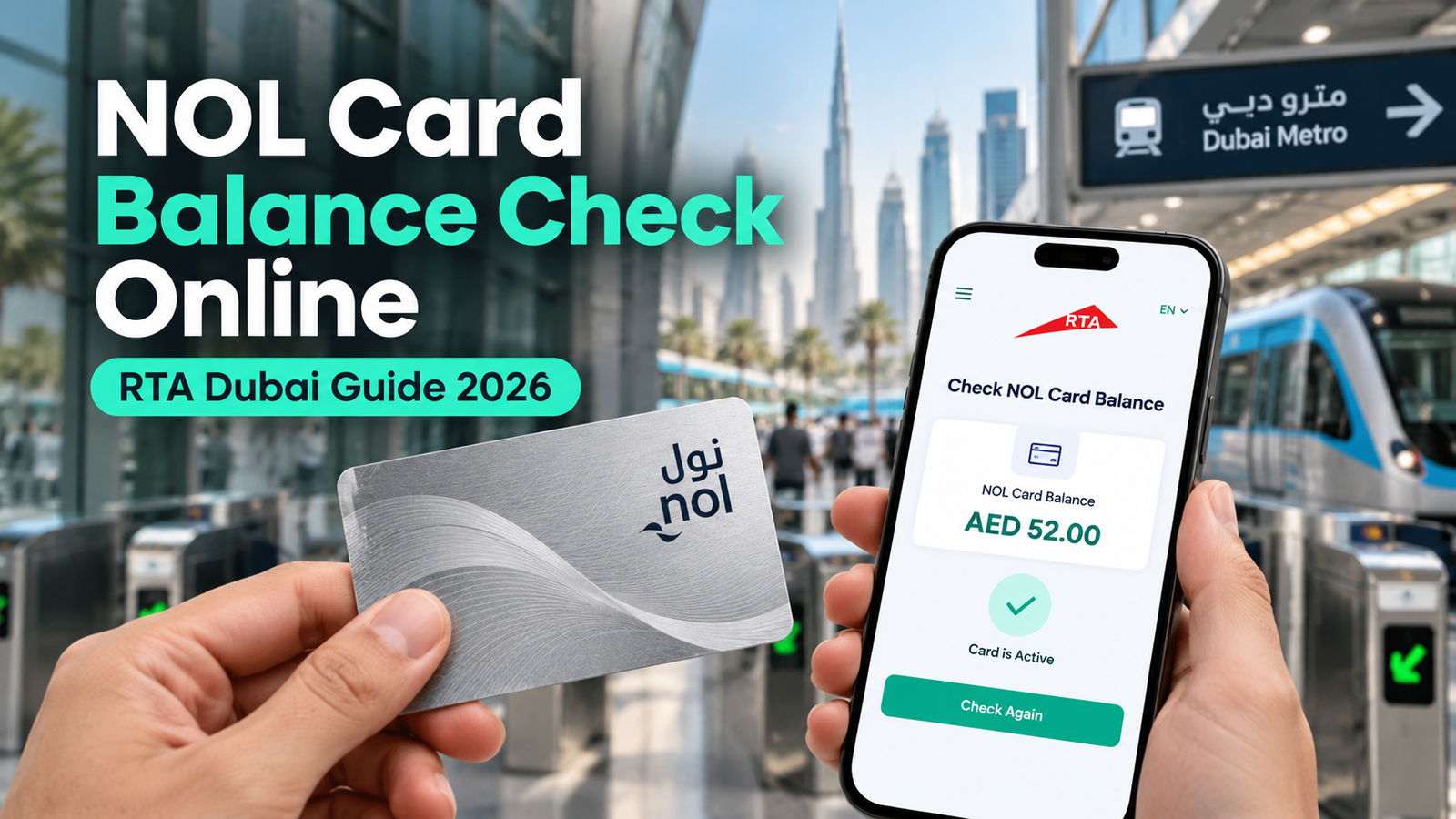
Nol Card Balance Check Online UAE: Quick Answer (2026)
To check your nol card balance online in Dubai, open the official Roads and Transport Authority (RTA) balance-check service, enter the 10-digit nol tag ID printed on the card and select the search or check option. You can also use the official nol Pay app or a supported ticketing machine at a Dubai Metro station.
GulfInside is an independent guide, not an RTA balance checker. Never enter payment-card details or sensitive information into an unofficial website promising instant balances.
Updated October 2026. A nol card is used for eligible RTA travel and payments across Dubai. Checking the card before a Metro, tram or bus journey helps prevent interruptions at ticket gates. This detailed guide explains how to check your nol balance using the RTA website, nol Pay app or station machines; what pending top-up credit means; how to check expiry and transaction activity; and how to solve common errors. Service menus and conditions can change, so the official RTA links below are the final reference.
How to check nol card balance online on the RTA website
- Open the official balance service: visit RTA – Check Nol Balance, or navigate from the RTA homepage to the nol balance section.
- Find the nol tag ID: turn over your physical nol card and look for the 10-digit tag ID printed on it. This is not a bank-card number or Emirates ID number.
- Enter the tag ID: copy the digits accurately into the official form. Do not add spaces or other numbers unless the live RTA form instructs you to do so.
- Submit the enquiry: select the search or check button; follow any verification prompt displayed by RTA.
- Read the result: review the card balance and any other details shown, such as pending top-up credit or expiry date where available.
Important correction: Some older third-party tutorials confuse a 10-digit nol tag ID with a 14-digit number. RTA-linked guidance for the online balance checker uses the 10-digit nol tag ID. Always match the label and format on RTA’s live service.

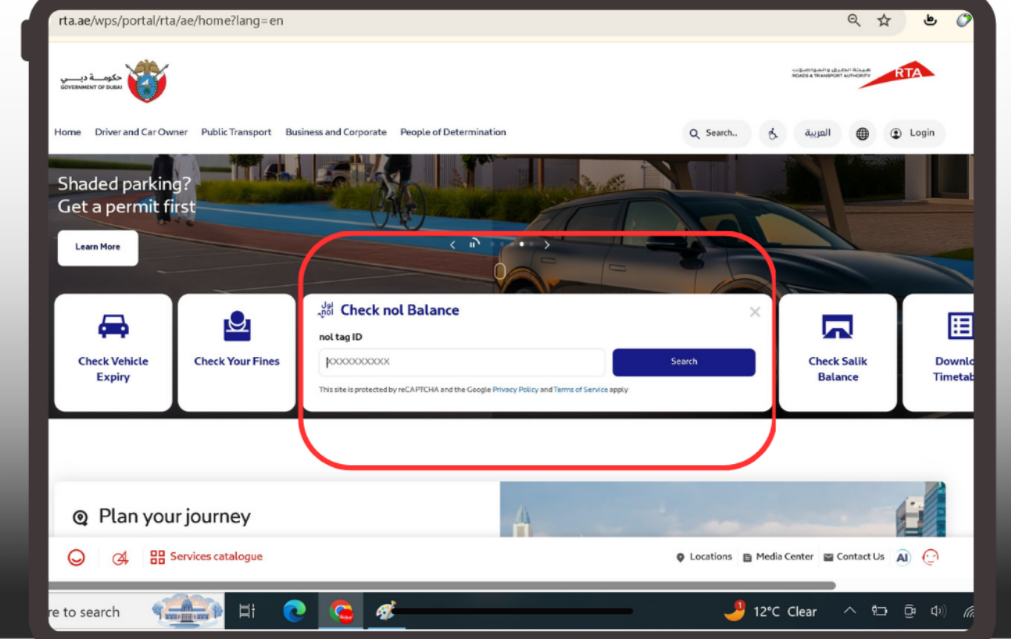
Nol card balance check with card number: which number do I enter?
The search phrase nol card balance check with number normally means checking by the nol tag ID on the back of your card. It does not mean your mobile number, UAE Pass identifier or payment-card number. Different cards and products can look different, and a red ticket may not support the same web lookup as a reusable physical nol card. If the number is unreadable, use a supported station machine or ask RTA customer assistance.
| Method | What you need | Best for |
|---|---|---|
| RTA website | Card’s nol tag ID | Checking balance from a browser |
| nol Pay app | Supported phone/app and relevant card | Balance, top-up and card management |
| Metro station machine | Physical card | Checking balance without home internet |
| RTA-authorized sales channel | Card and channel-supported service | Assisted enquiries and recharge |
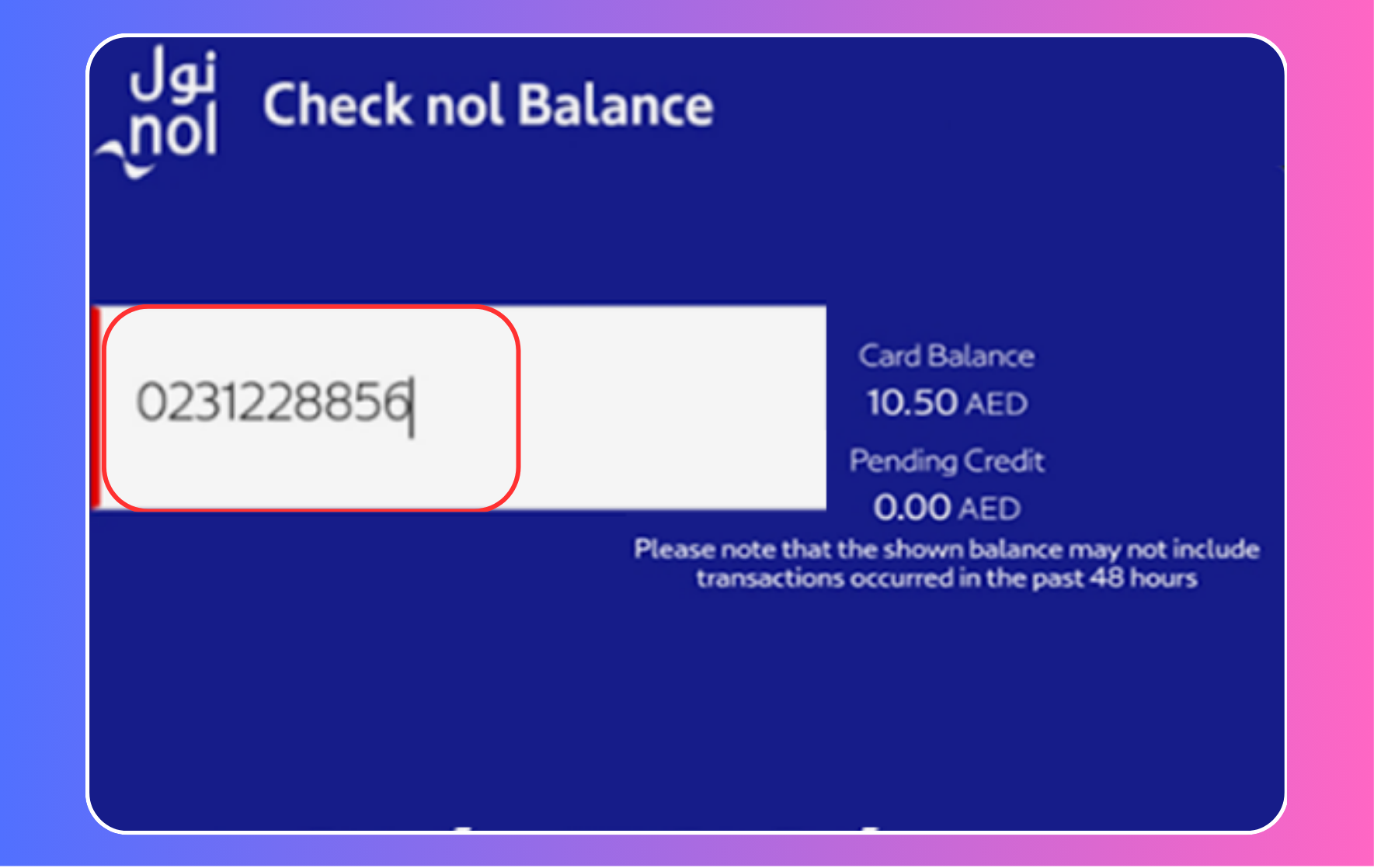

How to check nol card balance using the official nol Pay app
RTA’s nol Pay app supports card balance checks and top-ups, plus other card-management functions depending on the phone, operating system and type of nol card.
- Download nol Pay from a store linked on RTA’s official app page.
- Open the app and follow any sign-in, card-linking or phone-permission instructions for your card type.
- Choose the available card/balance feature. On supported NFC-enabled phones, the app may request that you hold your physical card near the phone’s NFC reader.
- Review the displayed balance, pending amount and available services.
- If you recharge, check whether the new top-up must be activated by tapping at a supported device.
Tip: Not every phone supports card reading by NFC. If you cannot scan your physical card, the RTA website or a Metro station machine may be easier.
How to check nol balance at a Dubai Metro station
You can also check your Dubai Metro nol balance without opening a website. Find an RTA ticket vending or ticket-office machine that supports balance enquiries, present the card as indicated and view its balance. Follow the on-screen instructions if you also want to top up. Card readers at fare gates may display travel-related details, but don’t rely on a gate as your only means of checking your balance before boarding.
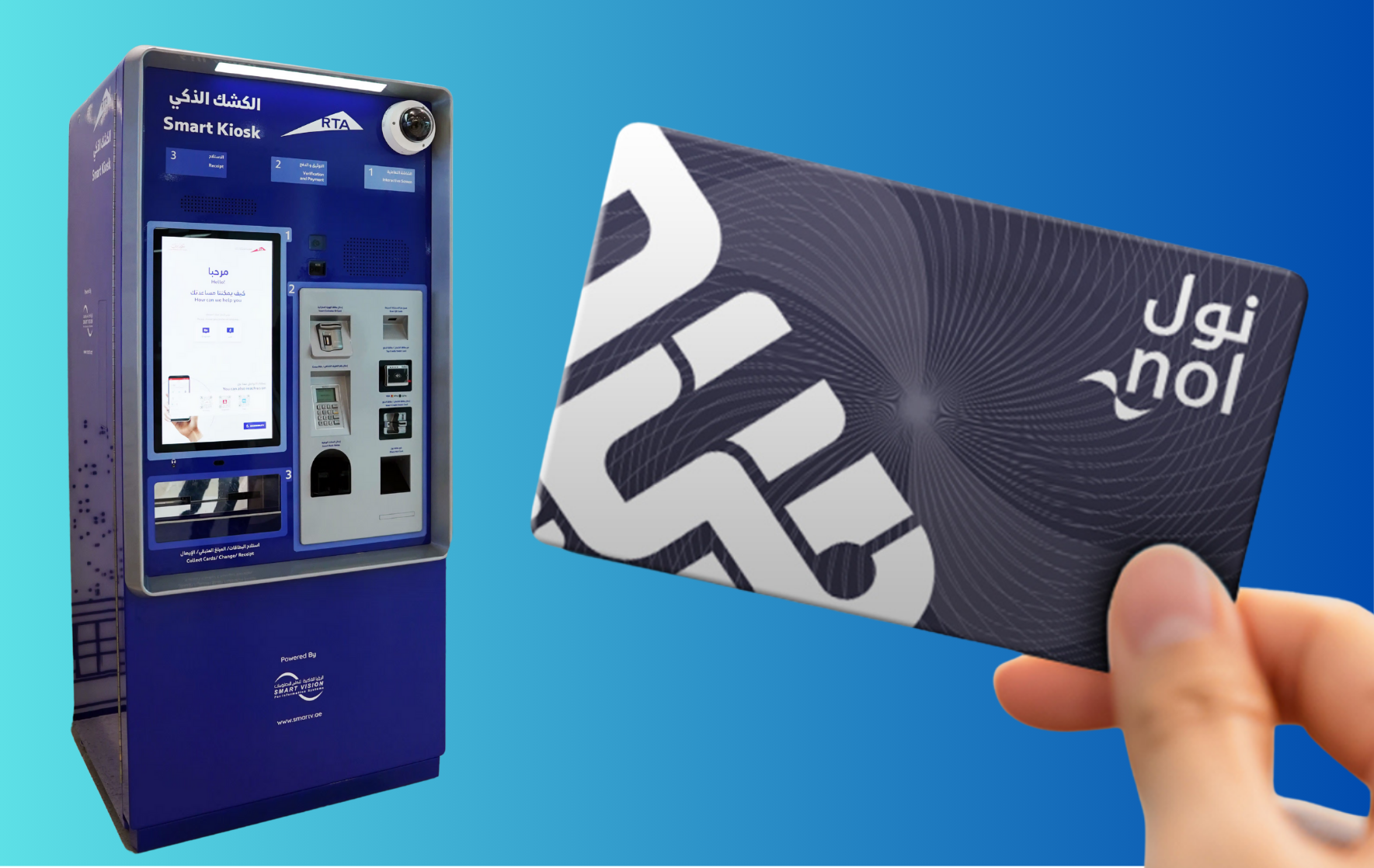

Nol balance not updated after recharge? Understand pending credit
A successful online payment does not always mean the new amount is already written to the physical card. RTA explains that some remote top-ups create a pending balance which becomes active when the card is presented to a supported device after the central ticketing system has received the update.
- Check the confirmation: keep the top-up transaction receipt or email.
- Look for pending credit: use the website or app to see whether the amount is pending rather than available for travel.
- Activate where supported: follow RTA’s current instructions for a suitable Metro gate, ticketing/top-up machine or other approved equipment.
- Do not assume a bus validator will activate it: RTA explicitly says bus validators cannot activate certain pending remote top-ups.
- Still missing? Contact RTA with the card tag ID and payment reference using the official support channel.
RTA’s service information says the minimum available balance needed to activate pending balance at a Metro gate may be AED 7.50, with a different threshold for some blue cards. This is a condition for that particular activation route, not a universal rule for all balance checks. Confirm current terms on RTA’s nol service details.
Nol card minimum balance, fares and expiry
Before travelling, check that your card has enough credit for the applicable journey. Fare requirements depend on the product and journey; RTA’s current fare rules should be checked rather than relying on a fixed figure from an older blog post. Card expiry may also affect use even when money remains. The official balance checker or eligible app functions may show an expiry date for supported cards.
If your card is damaged, expired or lost, use RTA’s official service options for your particular card type. Refund and replacement rules differ between registered/personalized and anonymous products, and the same process may not apply to a red ticket.
Nol card transaction history: how to find trips and top-ups
Many readers search for nol card balance history or RTA nol transaction history. Balance and transaction history are related but different: the balance shows usable credit, while transaction records may show individual trips, recharges and recent payments where supported.
- Start with RTA’s official nol services or the nol Pay app.
- Check whether the relevant transaction-history function is available for your card/account type.
- Follow any identification or verification requirements on the RTA service.
- Select the available date range if offered, and review the displayed travel or payment entries.
- For disputed charges, keep the dates and transaction references and contact RTA through official support.
A downloaded report is not necessarily available for every product or app version; avoid assuming that all cards have identical history features.
Can you check nol card balance by SMS?
Older articles circulate instructions to text a code to 511 to retrieve a nol balance. I could not verify that as a currently supported on-demand RTA balance service in the official sources consulted for this update. For that reason, GulfInside recommends the official RTA website, nol Pay app or supported station equipment instead of presenting the older SMS process as confirmed working.
Nol card balance check troubleshooting
RTA website says invalid nol tag ID
Recheck the 10-digit tag ID, confirm you are on the official RTA site, and make sure you are entering the tag number rather than another identifier. If the card has become unreadable or damaged, ask RTA for help.
The website cannot find my card
Try the supported nol Pay function or a Metro ticket machine. Some card types may have different enquiry options. Avoid entering your full payment-card details into unrelated websites.
The recharge payment succeeded but balance still looks old
Check for pending credit and follow RTA’s activation instructions. Keep the transaction reference if the amount is not credited after the applicable process.
I cannot scan my card with the phone
Check NFC compatibility and positioning. Use the RTA browser service or a supported Metro station machine if the phone cannot read the card.
My balance seems lower than expected
Review available transaction history, completed journeys and any pending transactions. Contact RTA with the relevant dates and card information through an official support route.
Dubai nol card types: Silver, Gold, personal and Red
The correct balance and recharge workflow can depend on the type of nol product you hold. Silver and Gold cards are common reusable products; personal/blue cards offer features tied to an eligible person’s account, while red tickets serve different travel needs. Do not assume that card issuance prices, fare limits, discounts, replacements or refund privileges are identical across these products.
For current card issuance details and eligible digital card services, consult RTA’s official nol card services.
Useful related GulfInside transport guides
- Nol card balance check: older full-process guide — additional background; compare instructions with the latest RTA service.
- How to recharge your nol card online and offline — dedicated top-up guide.
- Dubai Metro map and stations — plan your next journey.
Frequently asked questions about nol card balance
How do I check nol card balance online for free?
Use the RTA public balance-check service to enter your nol tag ID. The online balance lookup is different from topping up or paying for travel.
Where is the nol card number printed?
On a physical nol card, look for the tag ID shown on the reverse. Official RTA-linked guides identify a 10-digit nol tag ID for the online checker.
Can I check nol card balance without a mobile app?
Yes. You can use the RTA website or supported Metro station equipment.
Can I use nol Pay to recharge and check balance?
Yes. RTA lists balance-checking and top-up as core nol Pay functions, subject to device and product compatibility.
Why is my nol top-up still pending?
Some online top-ups require activation through a supported device. Follow the official RTA instructions rather than retrying the payment immediately.
Does the RTA website show nol card expiry?
Expiry information may appear in supported online checks or card-management functions. If you cannot find it, use a compatible station service or RTA customer assistance.
Is nol card balance check available for tourists?
Tourists holding supported nol cards can use the available RTA balance-enquiry methods. The specific product determines which functions work.
Can I check a Red nol ticket the same way as a Silver card?
Not necessarily. Red tickets differ from reusable cards, so confirm the ticket’s supported enquiry and recharge options through RTA.
What is the difference between available and pending nol balance?
Available balance is usable credit already recognized by the card/service. Pending credit may require activation at an approved validator or machine.
Who should I contact if an RTA balance enquiry fails?
Use RTA’s official website to find current customer-support channels and service information.
Editorial note: This independent guide was updated in October 2026. Card functionality, fares and machine instructions can change. RTA is the authoritative source for live nol services and account balances.