
















Updated: 23 October 2026 · Official service information reviewed by GulfInside
Trying to check a fine with your Emirates ID can get confusing very quickly. One website sends you to MOI, another says to use ICP, and someone else tells you to download TAMM. All three can be useful, but they do different jobs.
For traffic fines, start with MOI or the relevant emirate’s traffic service. For Abu Dhabi traffic fines, use TAMM. For an Emirates ID renewal penalty, check your ICP identity-card application. For a visa or immigration fine, use the service responsible for your immigration file.
This guide explains how to choose the right route, what to have ready, how to review a result and what to do if a payment or enquiry goes wrong. It also explains why a clear traffic-fine result does not settle a separate question about your visa.
What does “Emirates ID fine” actually mean?
People use this phrase for several different things. Someone may have received a traffic ticket that can be searched using an ID number. Another person may have missed the deadline to renew their identity card. A third may be worried about staying beyond their permitted immigration period.
The Emirates ID helps identify the person. It does not make all these penalties the same. Before entering any details, ask yourself two questions: what happened, and which authority issued the notice?
For example, if the message concerns a vehicle, begin with the traffic service. If the amount appears while renewing an ID card, investigate it through the identity-card application. If the problem concerns a cancelled residence permit, begin with the immigration file. This small distinction saves a lot of searching in the wrong place.
| Your enquiry | Where to start |
|---|---|
| Traffic violation | MOI or the issuing emirate’s traffic service |
| Abu Dhabi traffic fine | TAMM Traffic Fines Payment |
| Dubai traffic fine | Dubai Police or the applicable RTA service |
| Late Emirates ID renewal | ICP Identity Card Renewal |
| Visa or immigration penalty | ICP or GDRFA Dubai, according to your file |
| Unemployment insurance penalty | MOHRE’s unemployment-insurance channels |
| Parking, toll or public-transport notice | The operator or authority named on the notice |
Do not treat an empty result from one service as a clearance certificate for every authority. An enquiry answers the question you submitted, using the information and service you selected.
What to have ready before checking
You do not need every document for every enquiry. Keep the relevant information nearby so you can complete the form without guessing:
- Your Emirates ID, if that search option is offered.
- The fine notice or SMS, including its reference number.
- Your vehicle plate details, driving licence or traffic-file information for a traffic enquiry.
- Your passport and immigration-file details for a visa-related question.
- Access to your own UAE PASS account when the service asks you to sign in.
- A previous payment receipt if you have already paid.
Read the field label carefully. A traffic-file number, passport number, Emirates ID number and application reference are different identifiers. Copying the right number into the wrong field can produce an empty result that looks convincing but tells you very little.
On a shared computer, avoid saving documents or passwords in the browser. If you need assistance, stay present while the enquiry is completed. There is no reason to send a stranger your UAE PASS approval or bank-card security code just to find the correct service.
How to check traffic fines using MOI
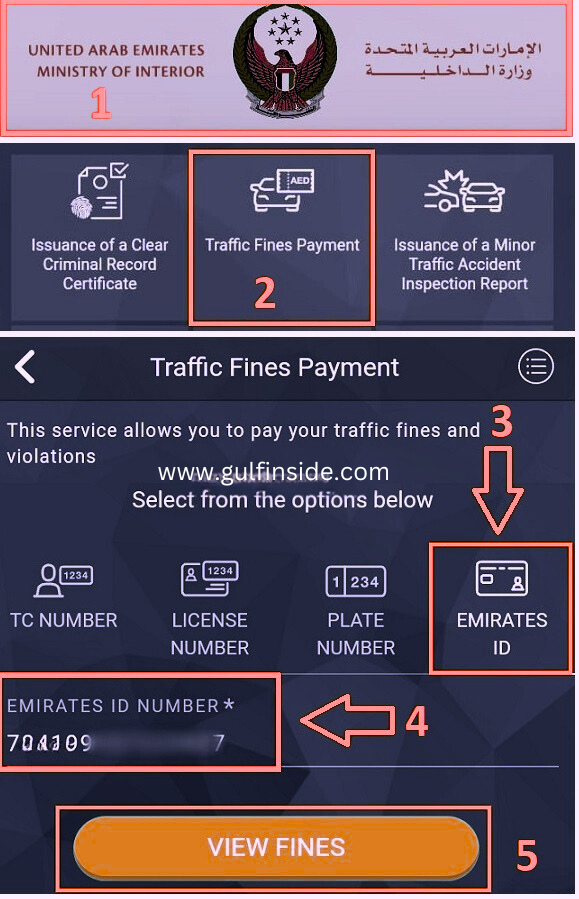
The Ministry of Interior’s published Traffic Fines Payment manual includes an Emirates ID search option. It also describes searches using a traffic profile, plate information, licence number and fine information. Use the option available for your record.
- Open the official MOI website or its official app.
- Find the traffic services section and open Traffic Fines Payment.
- Complete the sign-in or verification requested by the current service.
- Select Emirates ID where offered, enter the requested information and complete the security check.
- Run the enquiry and review the returned records.
- If the ID search does not locate the expected ticket, check another supported identifier or contact the issuing authority.
Use the official MOI website to reach its Android or iPhone app listing. That avoids confusing an unrelated app with the government service. Menu labels and sign-in screens can change, so follow the current form rather than expecting an older screenshot to match exactly.
Check the ticket before deciding what to do
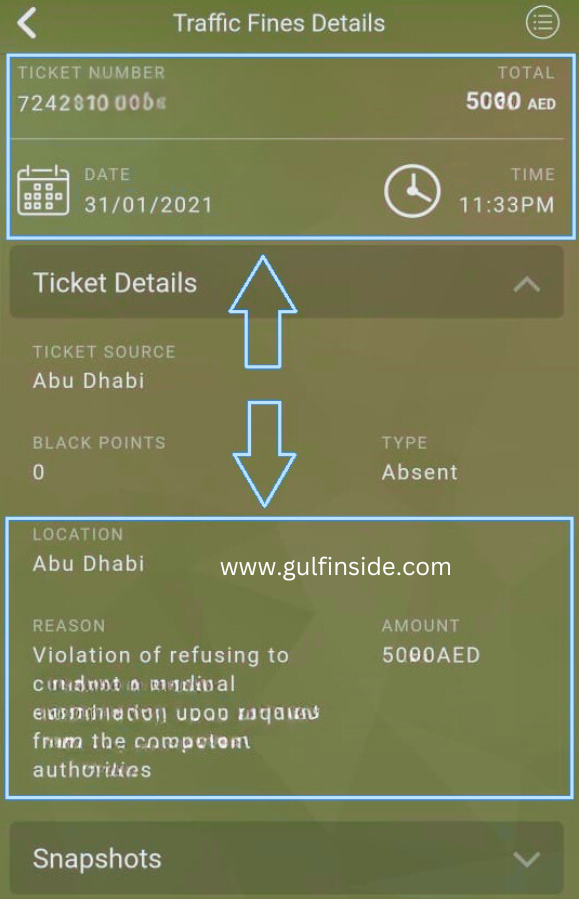
Do not focus only on the amount. Compare the ticket reference, date, location, vehicle or other identifier and the description of the violation. If several entries appear, review each separately. Two tickets with similar amounts are not necessarily duplicates.
If you are enquiring about a family vehicle, confirm which registration or traffic record the notice refers to. A car used by several people can make it easy to confuse the owner, the person who was driving and the person making the payment.
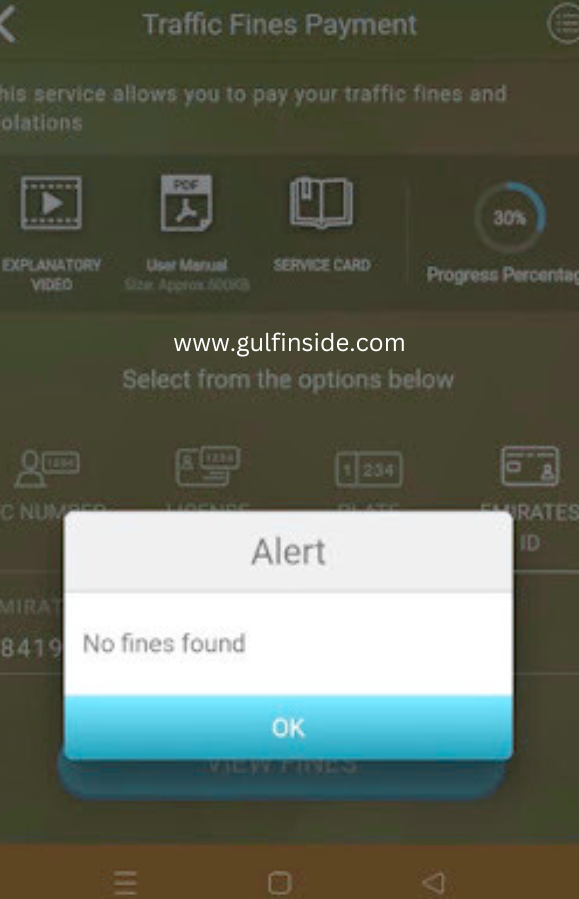
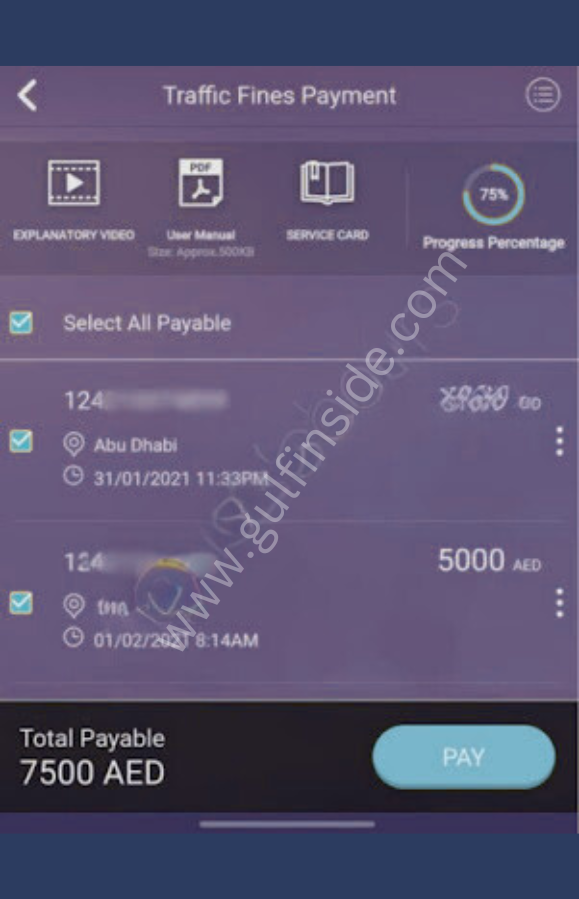
View the older MOI screenshots preserved from this guide
These screenshots are retained as historical examples. Their screens and sample tickets predate this update. The older violation descriptions and amounts are not a current tariff or proof that the same ticket applies to you.
How to check Abu Dhabi traffic fines through TAMM
For Abu Dhabi, start with the official TAMM Traffic Fines Payment service. The Abu Dhabi Police website also directs users to TAMM for this service.
- Open TAMM’s official website or app.
- Search for Traffic Fines Payment.
- Sign in with UAE PASS when prompted.
- Follow the enquiry options shown for your profile and provide any required details.
- Review the matching fines and the requirements shown against each entry.
- Continue to payment only when you are satisfied the record is correct.
If you cannot find the old menu path, use TAMM’s service search. A shortcut in an older article may refer to a layout that has since changed. Searching by the service name is usually more practical than looking for the same icon in the same position.
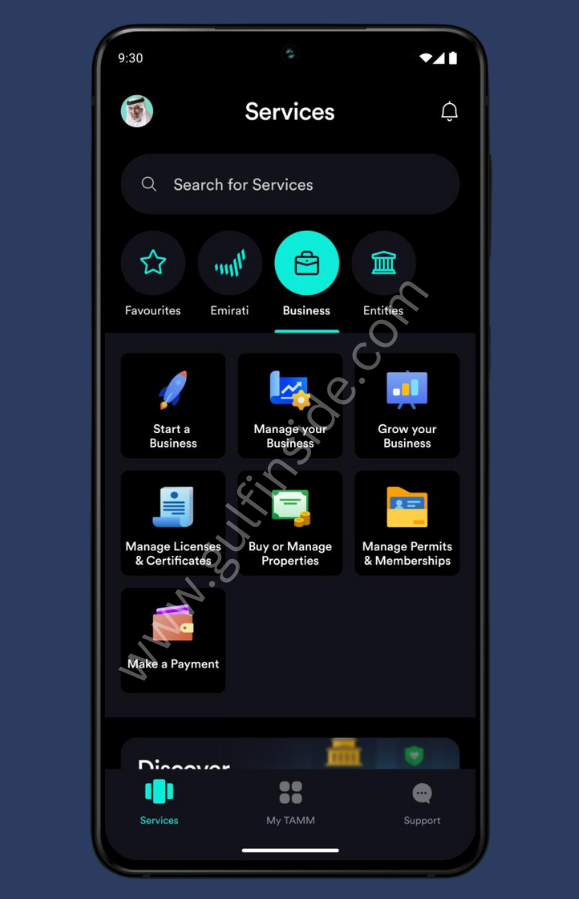
View the older TAMM screenshot
This is an earlier TAMM app image retained from the original article. Use the current service search and on-screen instructions.
What if TAMM opens but no relevant record appears?
First check that you are using the intended account and service. Keep the notice open beside the enquiry so you can compare identifiers. If the ticket belongs to a different vehicle record or the screen asks for a particular reference, resolve that mismatch before assuming the fine has disappeared.
If you contact support, explain exactly what you tried. “I searched using this type of identifier and received this message” gives the adviser more to work with than “the website is not working.” Share personal details only through the authority’s approved support channel.
How to check Dubai traffic fines
Use Dubai Police’s official services directory to find Fines Inquiry and Payment. Its service description refers to vehicle plate, driving licence and traffic-code records. Have those details available rather than assuming an Emirates ID-only option will appear on every screen.
The RTA website also provides fine-related services. Choose the service that matches the ticket, such as vehicle or parking fines. Follow its listed payment requirements if the record involves additional procedures.
A useful habit is to compare the wording on your notice with the service you are opening. “Dubai fine” is a broad description. A traffic violation, a parking notice and a public-transport penalty may need different enquiries even though all occurred in the same emirate.
How to check Emirates ID late-renewal penalties
Emirates ID issuance and renewal are handled by the Federal Authority for Identity, Citizenship, Customs and Port Security, known as ICP. For a penalty relating to a late ID renewal, begin with the ICP Identity Card Renewal service and your application record.
Open the relevant application through ICP’s official channels, review the fee breakdown and ask ICP about any unexplained delay charge. A traffic-fines search is not a substitute for checking what appears against an identity-card application.
How much is the late-renewal fine?
According to ICP’s official FAQs, the late-renewal fine is AED20 per day after 30 days from the card’s expiry, up to AED1,000. Confirm the charge assessed on your own application, particularly if an exemption or a correction may apply.
For a simple illustration of the arithmetic, 10 chargeable days at AED20 would equal AED200. Fifty chargeable days would reach AED1,000. These examples show only how the stated daily amount and cap work; they do not determine the chargeable dates for an individual case.
Write down the expiry date before asking about the amount. If a renewal was returned for missing information, keep the application reference and any messages requesting documents. The sequence of events matters more than a rough calculation based on when you first noticed the expired card.
Card status and fine status are separate questions
Checking whether an application has been received or a card is being produced does not answer every question about outstanding charges. Read the application status and fee information separately. If you need help tracking the card itself, see our Emirates ID status guide.
How to check visa and immigration fines
A visa or residency penalty concerns your immigration record. Begin with the authority responsible for that file. Check the permit or application paperwork if you are unsure; do not choose solely according to the emirate where you happen to be living today.
Using ICP
Open ICP Smart Services through the authority’s official website. Locate the applicable fines or immigration enquiry service and follow the current form. Provide the identifiers it requests. If the service does not offer your intended search method, use an available option or ask ICP which enquiry applies.
We have not completed a personal, signed-in immigration enquiry for this article. The portal is dynamic, so we do not promise a fixed sequence of buttons or that every file can be searched with an ID number alone.
Using GDRFA Dubai
GDRFA Dubai’s official Fines Inquiry Service offers search types including file number, UDB number, Emirates ID and passport number.
- Open the official enquiry page.
- Select the search type matching the information you hold.
- Complete the fields displayed for that search.
- Finish the security check and submit the enquiry.
- Review the result against the relevant immigration file.
Do not confuse a passport number with a UDB or immigration-file number. If an old passport or a different application is involved, explain that to the authority instead of repeatedly changing details until a result appears.
What is the UAE overstay fine?
The UAE government portal states that overstay charges for visit, tourist and residence visas have been standardised at AED50 per day. The applicable grace period depends on the visa or residence category and circumstances. Check your own permitted-stay deadline.
An overstay penalty and an ID renewal penalty are separate. The AED1,000 ID late-renewal cap should not be applied to an immigration calculation. Also, paying an amount does not by itself tell you whether your immigration status has been regularised. Ask the responsible authority what further action your file requires.
For more on this subject, read our UAE visa fine enquiry guide.
What about ILOE, parking, toll and other penalties?
For a penalty outside traffic, immigration or identity-card renewal, follow the organisation named on the notice. Start with the reference you were given and identify the service that handles it.
Unemployment insurance: Use MOHRE’s official channels for the appropriate unemployment-insurance fine enquiry. The UAE government’s unemployment-insurance overview explains the scheme. Do not expect an MOI traffic enquiry to answer an employment-insurance question.
Parking and tolls: Read the notice for the operator, location, vehicle details and reference. Then open that operator’s official service. If a rental car was involved, ask the rental company for the underlying ticket and a separate explanation of any administration charge.
Public transport: Keep the penalty reference and any travel record that may be relevant. A transport penalty should not be confused with the balance on a travel card. Our Nol balance guide covers checking the card balance, which is a different task.
Any other notice: If the message does not clearly identify the issuing authority, verify it before making a payment. Search results and payment links are not evidence that a demand is genuine.
How to pay a fine safely
Once you have found the right record, slow down for a moment before paying. Check the reference, the amount and the authority receiving the payment. If you intend to dispute the ticket or request an exemption, read the relevant process first so you understand how payment may affect the next step.
- Open the record in the official service.
- Review the item you are selecting, especially when several fines appear.
- Check the final total and any separately displayed charges.
- Complete any additional requirement shown against the ticket.
- Use a payment method offered by the official checkout.
- Wait for the transaction result and save the receipt.
- Check the record again as directed by the service.
Keep the receipt reference, payment date, amount and ticket number together. A bank notification is useful, but it may not explain which government record was settled. A labelled receipt is much easier to find later than an unnamed screenshot among hundreds of photos.

If your card is charged but the fine still appears
Avoid making the same payment again immediately. First check whether the bank entry is pending or completed and whether the government service produced a receipt. Note the time and reference of your first attempt.
Contact the service’s payment support with the transaction details and ask how to reconcile the record. If the payment was not completed, follow the instructions given by the authority and your bank. Do not assume a fixed refund or posting time when the checkout has not provided one.
When sending evidence, hide unrelated transactions and card details. Support needs enough information to identify the payment, not a complete copy of your banking activity.
Common enquiry problems and what to try
“No fines found” when you expected a ticket
Check the service, identifier and issuing authority first. Then compare the information with the notice. If another supported search method is available, use it. Keep a record of the result and contact the authority if the discrepancy remains.
There is no single posting time we can responsibly give for every kind of UAE penalty. Do not rely on a general claim that all fines appear within 24, 48 or 72 hours. A recent enquiry result is not a guarantee about what another authority may hold.
The ID number is rejected
Look for a typing error, an extra space or the wrong search type. Follow the format requested on the page. Avoid repeatedly entering someone else’s details to test the form. If your document and the official record do not match, ask the authority how to correct the record.
UAE PASS will not approve the login
Make sure the request came from the service you intentionally opened. Check the app and follow its account-recovery or support instructions if necessary. Do not approve an unexpected request simply because a caller says it will clear a fine.
The page loops, freezes or will not load
Try the current official app or a different up-to-date browser. Close an expired session before starting again. If the problem happened during payment, check the transaction status before retrying. For a support report, note the service name, error message and approximate time.
You no longer have access to the registered phone
Use the official account-update or recovery process. If you cannot complete it online, ask the authority which assisted channel is appropriate. Never use another person’s identity account as a shortcut to access your own private records.
You are dealing with a rental or company vehicle
Ask the organisation responsible for the vehicle for the ticket reference and the record used to identify it. Separate the government penalty from any contractual company charge. Keep a copy of the breakdown and clarify who is responsible for any further procedure.
Can you dispute a fine, request an exemption or get a discount?
These are three different requests. A dispute challenges the ticket or its attribution. An exemption asks for relief under an approved rule. A discount reduces an eligible amount under a specific arrangement. Choose the process that matches your situation.
If you believe the fine is wrong
Contact the issuing authority and ask for its review or objection procedure. Prepare a short explanation of what is incorrect, the ticket reference and any relevant evidence. Keep the explanation factual. Dates, documents and a clear description are more useful than a long complaint without supporting details.
Check whether a submission deadline or particular form applies. Keep the acknowledgement and follow-up reference. Do not assume that opening a support conversation automatically registers a formal objection or pauses another deadline.
ICP exemption from ID delay fees
ICP has an official Request for Exemption from Delay Fees service. Its service card says the request is submitted with the identity-card application, requires supporting proof under the applicable conditions and uses UAE PASS access.
Read those conditions before applying. Prepare the evidence relevant to your circumstances, submit the request through the stated channel and keep the application reference. ICP may request changes, accept the request or reject it. Being a first-time applicant does not, on its own, establish eligibility for a waiver.
Discounts and instalments
Check the issuing authority’s current announcement and the options shown for your own fine. Do not apply a discount advertised for one emirate to a ticket from another. Check the eligible offence, payment deadline, exclusions and final total.
If instalments are offered, read the payment provider’s terms as well as the government checkout. Understand any charges and repayment obligations before choosing the option. A lower monthly payment does not necessarily mean a lower total cost.
A typing centre or adviser may help submit an application, but ask what service they are providing and what they charge. A service fee is separate from the fine. Be cautious about anyone promising a guaranteed reduction before the authority has reviewed the case.
Before renewing an ID, renewing a visa or travelling
Deal with the record that matters to the planned transaction. If you are renewing an ID, review that application and its requirements. If you are resolving immigration status, check the immigration file. If you are renewing a vehicle document, check the relevant traffic record.
Do not assume every unpaid penalty automatically creates a travel ban or bank restriction. Equally, do not treat an empty fine search as confirmation that you can complete every government transaction. Ask the responsible authority about any restriction shown against your specific file.
Before an important deadline, put these items in one place:
- The relevant expiry or permitted-stay date.
- The notice and enquiry result.
- Any payment receipt.
- An objection or exemption acknowledgement, if applicable.
- The next action requested by the authority.
If an adviser is helping, ask them to explain what remains outstanding in plain language. “Payment received,” “application submitted” and “case closed” describe different stages. Knowing which stage you have reached helps avoid an unpleasant surprise later.
Frequently asked questions
Can I check a fine using only my Emirates ID?
Some official enquiries offer an Emirates ID search. Others ask for additional information or a different identifier. Use the fields offered by the specific service rather than expecting one number to retrieve every kind of penalty.
Is there one website showing all fines in the UAE?
This guide does not identify a single enquiry that certifies your position across every authority. Choose the service by fine type and issuing authority. Keep separate enquiries separate.
Does “no fines found” mean I have no immigration problem?
A traffic enquiry does not determine your immigration status. Check the immigration service responsible for your file if your concern is a visa, cancellation or permitted-stay deadline.
Can I check without UAE PASS?
Requirements differ. Some public enquiry forms offer a search with identifiers and a security check; personalised services may require sign-in. Follow the official service’s current requirements.
Can I check from outside the UAE?
You can try the relevant official online service, subject to its access and verification requirements. Keep access to your own account and contact the authority if the required verification cannot be completed.
Does paying a fine renew my Emirates ID or visa?
Payment and renewal are different tasks. After payment, check what remains to complete the relevant application. Keep the receipt and the application reference.
Should I pay again if I did not get an SMS?
Check the official transaction result and receipt first. If the outcome is unclear, contact payment support with the reference and bank entry. An absent SMS is not sufficient reason to make a duplicate payment.
Can GulfInside check my personal fine?
No. We explain the public services but cannot access private government records. Please do not put your Emirates ID number, passport details, card information or verification codes in the comments.
Why do the older screenshots look different?
The original guide used earlier app screens. We have preserved them in expandable sections and labelled them as historical examples. Use the current official service for the actual enquiry.
Official sources and further reading
The public sources below were reviewed on 23 October 2026. Signed-in screens, individual fine records and payment outcomes were not tested. Service menus and eligibility rules can change; the responsible authority’s current instructions apply to your case.
- MOI UAE: official website and app access
- MOI: Traffic Fines Payment user manual
- TAMM: Traffic Fines Payment
- Dubai Police: services directory
- RTA Dubai: official services
- ICP: official FAQs
- ICP: Identity Card Renewal
- ICP: exemption from ID delay fees
- GDRFA Dubai: Fines Inquiry Service
- UAE government: residence visa provisions and overstay fines
- UAE government: unemployment insurance scheme
More from GulfInside: Track your Emirates ID · Check visa fines · Abu Dhabi fine enquiries.