
















Salik (slk) is an electronic road toll system that is used by Dubai, UAE. It was first introduced at the end of 2007 by RTA (Roads and Transportation Authority) Salik Toll Gate System ensures seamless flow of traffic fllow throughout the Emirates. The system is automated and detects tags on the windshield and charge the money from your Salik account. To make this take place, you need to have enough funds within the Salik account. Along with frequently recharge Salik accounts, Salik Balance check is important for you prior to driving. The good news is that checking the balance of Salik isn’t a big deal and just takes just a couple of minutes, Let’s begin with a brief overview of the registration process for salik, salik balance check and recharge of salik.
Where You Can Buy Salik Tag:
- RTA (Road & Transport Authority) sales point
- Designated retailers
- Purchase a Tag Online
- Fuel Stations in Dubai (EPPCO, ADNOC, ENOC)
Salik Registration Requirements:
- Mmulkiya or TC number from vehicle license
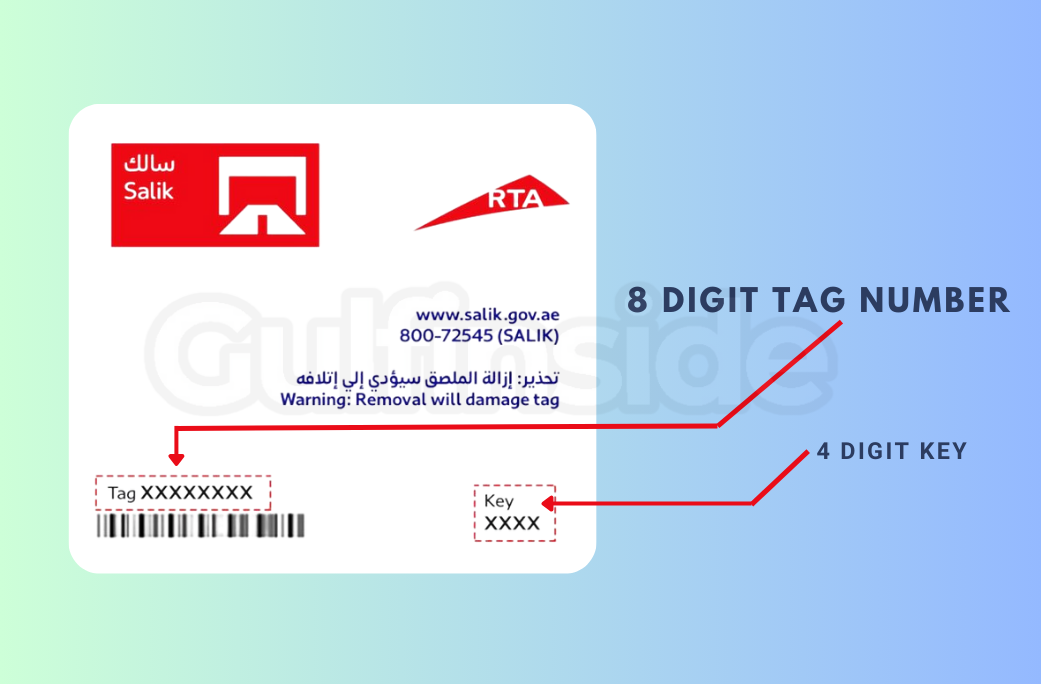
- 8 digits tag number along with 4 digits key number.
- Valid Mobile number for Salik text messages.

Salik Activation Methods:
- Method 3: RTA Dubai Drive App (Apple – Android)
- Method 2: Salik App (smart salik) (Apple – Android)
- Method 1: Salik Website (www.salik.ae/en)
- Method 4: Dubai Now App https://dubainow.dubai.ae
- Method 5: Customer happiness center (location)
- Method 8: Email at customerservice@salik.ae
- Method 6: Salik call center for UAE (80072545)
- Method 7: International call (+97142335000 + 97142335005)
How to Activate Salik Tag via Salik Website:
Salik registrations are now paperless. To activate it online, you just need to purchase tags and follow the below steps.
- Open tag and look for tag number and key number.
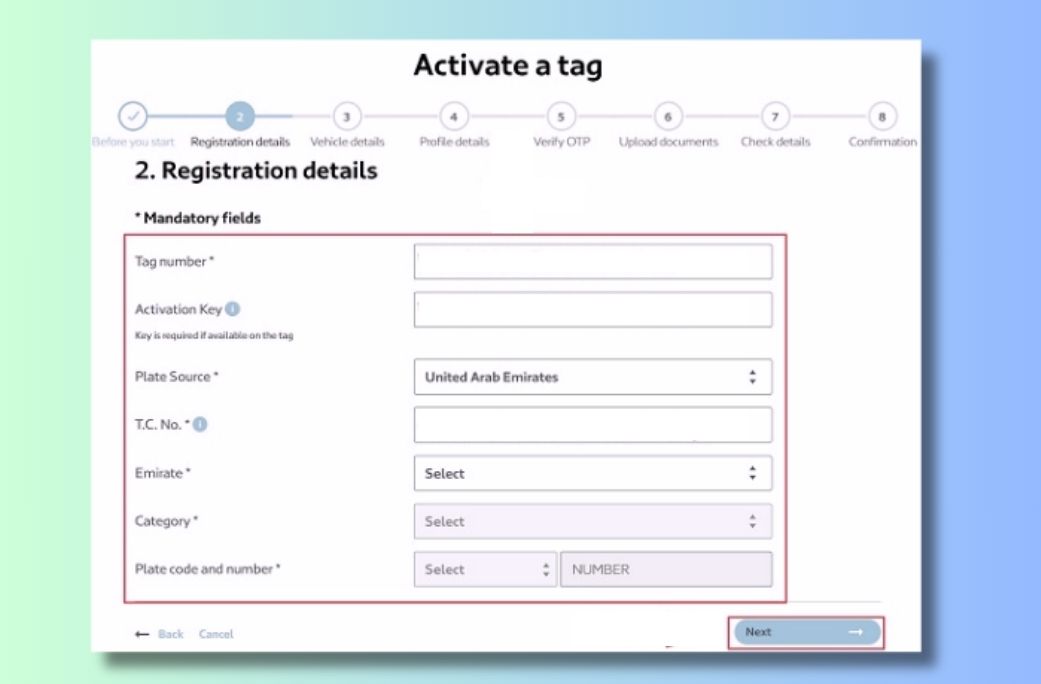
- Go to salik official website and then click on Activate a tag.
- Input the Mulkiya TC number, Salik tag number and your mobile number.
- Choose your emirates and vehicle category.
- Select license plate code and write license plate number.
- Click on continue (Next)
- 7. Check the details of the vehicle that auto detected and then click next.
- 8. Note down personal or company information, including email address and mobile phone number.
- 9. Send and confirm OTP.
- 10. Review all the details (vehicle tags, vehicle etc.) and then submit
- 11. Verify confirmation via SMS or download the pdf file to obtain your account number to log in to log in.
Link: https://customers.salik.ae/en/salik-services/my-tag/activate-tag
RTA: https://www.rta.ae/wps/portal/rta/ae/home/rta-services/service-details?serviceId=3704519
- 1. Install and download the Smart Salik App.
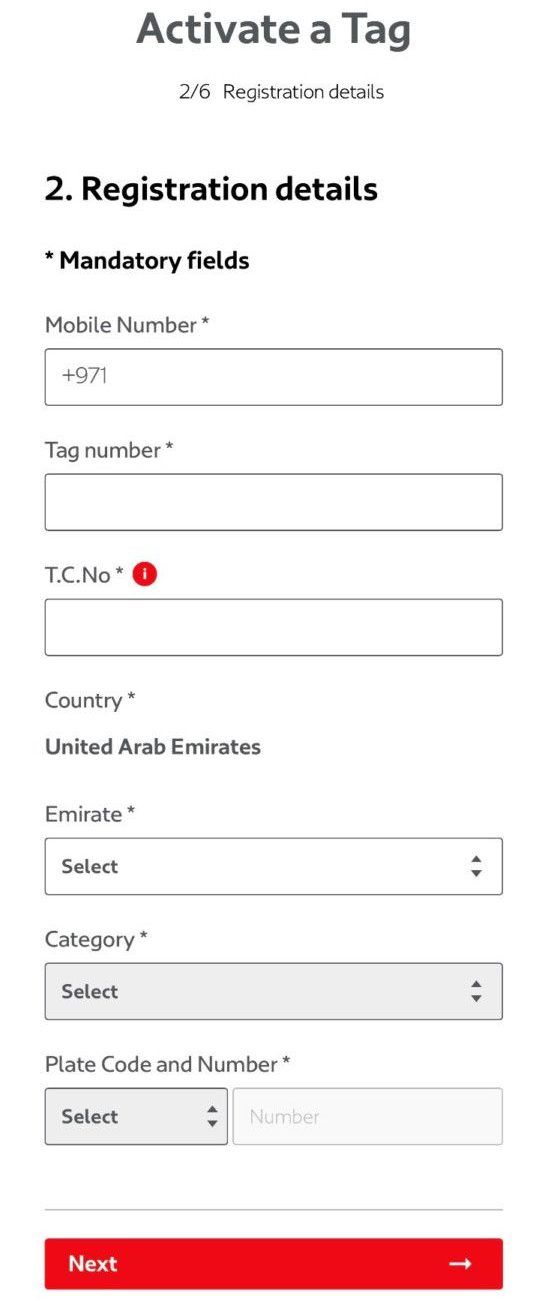
- 2. Select Tag activation, then press start.
- 3. Write T.C Tag and mobile number.
- 4. Fill plate details (emirates, category, plate code)
- 5. Verify your vehicle details.
- 6. Receive OTP via SMS and confirm it.
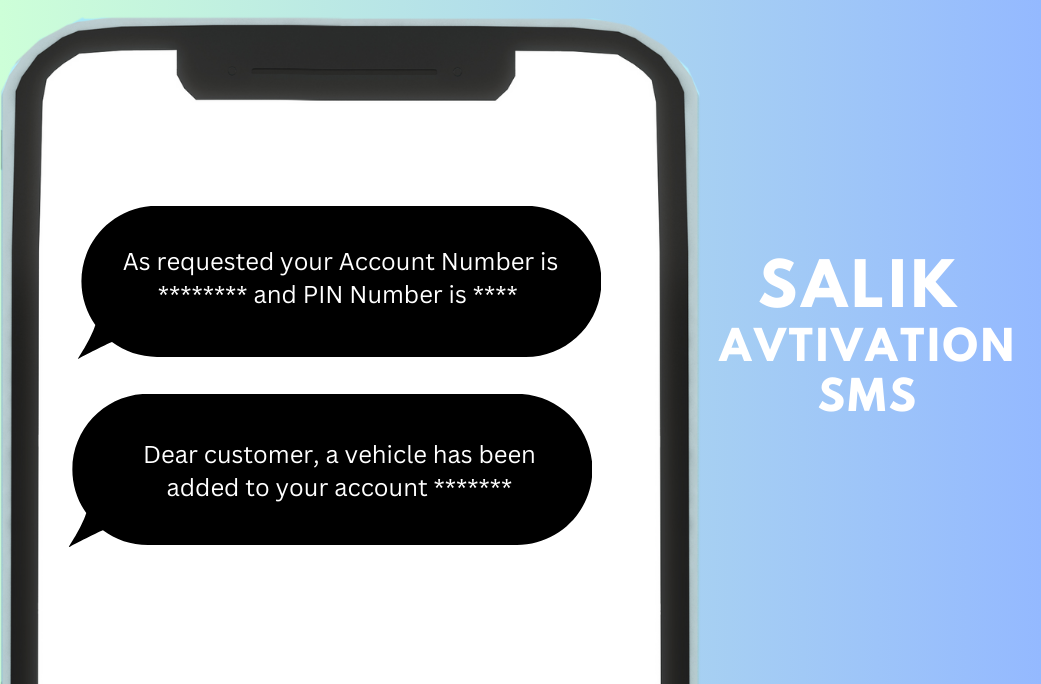
- 7. The salik tag has been successfully activated. You will be able to get your account number as well as pin number by SMS to use for recharge and login purposes.
Salik Balance Check Methods:
Now you can check salik balance with 5 different ways
- 1. RTA or Salik Official Website
- 2. Smart Salik App
- 3. Dubai Drive App
- 4. Text message to 5959 and include “Balance”
- 5. Toll Free (80072545)
Check Salik Balance in one minute:
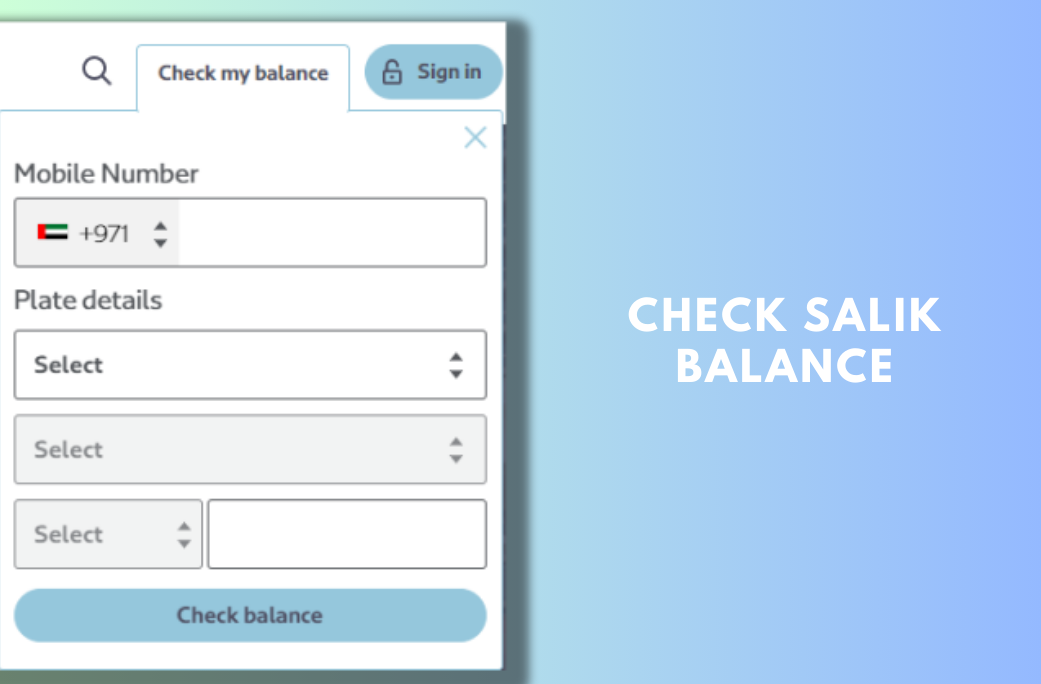
If you are asking “how to check salik balance without account number” You will find the right answer here. You can see the balance of your account online, without registration and without a number for your account just go to www.salik.ae/en, click to check my balance at the right side and follow the steps below.
- Write registered mobile numbers with zero.
- Choose Emirates (Dubai etc)
- Select vehicle type (Private etc)
- Choose code, write number of plate
- Click on the check balance button.
How to Check the Salik Balance in the Smart Salik Application:
Simply visit the salik log in page, input your username and password, then hit the sign in. You will see your balance displayed to you on the main page. It will also show any outstanding violations or trips (if there is any).
If you’re not registered with an salik dubai account, click “New Online User” to sign up for an account with the number of your account on salik.
Salik Balance Check Using SMS
One of the simplest methods to check the balance of your Salik balance is to send your SMS through Salik. Salik system. To determine your Salik balance by SMS follow these steps:
1. Create a new SMS message to your phone.
2. Enter “SALIK BALANCE” and send it to 5959.
3. In return, you will get an SMS from Salik to inform you of the current amount of your balance.
The process of checking your Salik balance through SMS is completely free You will be able to see your balance in just a few seconds.
How to Check Salik Balance on RTA Website:
Another method to check how much you have in your Salik balance is through Salik’s website. To check your Salik balance on the Salik website follow these steps:
Just visit the home page of RTA at https://www.rta.ae/wps/portal/rta/ae/home and look for check salik balance online next to check nol balance, simply write the plate number and the register mobile number, your available balance will be shown to you in a pop-up window.
Note This service is only available for Dubai Private plates and not for other vehicles. To verify the balance of vehicles registered in other Emirates, check the account numbers.
Ways to Recharge Salik Account:
- 1. Salik official website
- 2. Smark Salik app
- 3. Dubai drive app
- 4. Dubai now app
- 5. Self-service kiosks (Location)
- 6. SMS to 5959
- 7. A bank account ( Banks list)
- 8. By ePay, you can pay with credit or debit card
How to Recharge Salik Account:
Salik Recharge process is easy, it takes only a just a few minutes to get your balance in Salik up to date, we’ll walk you through the steps guide.
Salik Recharge Through Charge Card
- Buy a recharge card or an e-voucher.
- Take the 12 digits card number.
- Click to”Recharge my Account.
- Enter the recharge number, or scan the card using a camera.
- Press the confirm button.
- You will receive confirmation SMS in the near future and the recharge amount will appear in your balance.
Salik Recharge Online Through the ePay System:
- Make use of online payment for the option to recharge.
- Enter the amount, and then continue
- Choose payment method (credit card, net banking, noqodi)
- Enter your mobile number and email address to obtain OTP
- Pay and enter the payment information, then confirm the OTP
- Salik recharges are an absolute success.
Salik Recharge via SMS:
- Recharge card purchased recently number as well as pin and account number for Salik to 5959.
- The format of SMS text should be R*12 digits cardnumber*8 numbers salik account number*4 numbers pin number for salik.
- Example: R*123456789123*12345678*1234
- Send a message to 5959.
- The 30 fils amount will be taken as a service charge.
- The Balance will be upgraded after recharged.
Recharge Link: https://customers.salik.ae/en/salik-services/my-tag/Recharge
How Do I Install a New Windshield Salik Tag?
- Place your tag about 1 cm lower than the rear view mirror.
- Dry and clean your car prior to applying the sticker.
- Hold the tag near the edges, then peel the clear liner of the tag.
- Stick your tag on the salik and you’re done.
How Much Salik Fine?
Salik will fine people Salik to fine customers 100 AED when they pass through any of the the toll gate without a tag. If you don’t have tags in your car and have crossed the toll gate you will be sent a text message informing you the fact that ” you have passed through the gate of Salik using plate A1234 and not having an active tag from Salik. you must buy and activate a new tag by 7 days of the date to be free of fines.
There is also the possibility of being sanctioned by the salik in case you have passed through a salik gates that has a low balance. You have to recharge within 5 days or else you risk penalties.
How to Check and Pay Salik Fines?
Salik violation tickets may be paid and checked via the Salik violation page as well as via the these channels:
- RTA www.rta.ae
- Dubai Police www.dubaipolice.gov.ae
- Abu Dhabi Police www.adpolice.gov.ae/en
- Salik Violation Page (Link)
- By visiting Vehicle Registration Department
Salik Toll Gates Location in Dubai:
- Al Barsha
- Al Garhoud
- Al Maktoum
- Airport Tunnel
- Al Mamzar south
- Al Mamzar north
- Al Safa
- Jebel Ali
Toll Gates Map: https://www.salik.ae/en/toll-gates?csrt=17147291504729499008
How to Avoid Salik Toll Gates in Dubai?
- If you’re in Dubai and want to avoid the use of salik toll gates or don’t have the active tag of salik, it is necessary to research alternative routes. The roads with no toll gates are the highways such as Sheikh Mohamed bin Zayed Road and Emirates Road.
- You can also stay clear of tolls after changing settings on your Google Map driving preferences, letting the google map be free of tolls as you travel through the city.
- Additionally, you can download the RTA Smart Drive app to search for roads with no tolls in Dubai.
- A second alternative could be Salik tax exemptions. People with mental disabilities as well as physical disability as well as autism and visual impairments are eligible for exclusion from Salik fees..
- An extensive guide to activation of the salik app, salik recharge online and how to check your salik balance is finished with the hopes that there isn’t any omissions For questions, you can go to the the FAQs for Salik or post a comment to get clarifications.
At The End
The process of checking Salik balance is quick and simple There are a variety of ways to check salik balance. If you keep an eye on the Salik balance and utilizing the guidelines to manage it efficiently to avoid unexpected fees and guarantee your journey is smooth through Dubai. Therefore, the next time you’re looking to verify the balance of your Salik balance, follow this guide to check it quickly and efficiently.